

Schedule recurring work
A per-machine host scheduler clock drives all scheduled work. On each tick, due routines start job runs and due auto-tasks file tasks. Every routine and auto-task Orbit seeds starts disabled. Routines and Auto-Tasks explains the model; this page is the procedure.
1. Install the clock
Section titled “1. Install the clock”orbit routine init --install-clockThis installs a per-user unit (launchd on macOS, a systemd user timer on
Linux) that runs orbit every minute. Each tick reads routines and
auto-tasks from every registered owner checkout on this machine. Nothing is
scheduled until the clock runs.
orbit clock statusorbit clock pause # stop scheduled ticksorbit clock enableorbit clock set --cadence-seconds 300 # whole minutes only; a paused clock stays pausedA paused clock still allows a manual orbit , and pausing it leaves
each routine’s own pause state alone.
The unit runs Orbit by absolute path. If that binary moves or is removed,
ticks stop while orbit can still report the clock as enabled.
orbit repairs the unit; run orbit after installing
Orbit some other way. Repair never resumes a clock you paused.
To try a change, run a tick by hand:
orbit clock tick --dry-run --verbose # what would fire; writes nothingorbit --workspace <name> clock tick # only that workspace's schedulesScheduled credentials
Section titled “Scheduled credentials”Use this when a scheduled run needs a credential you normally export in your
login shell — a provider token, an API key, or a GITHUB_TOKEN. The clock
does not inherit that environment: launchd (macOS) or a systemd user timer
(Linux) starts orbit with no login shell, so a variable you
exported interactively never reaches the tick or the runs it starts. The
installed unit file never contains a secret.
Instead, the tick reads one machine-global file, ~/, beside
the global config.. It is not per-workspace, not in any checkout, and
never synced. Installing the clock creates it comment-only and owner-only;
reinstalling never overwrites an existing file:
orbit routine init --install-clock # creates ~/.orbit/clock.env if absentchmod 600 ~/.orbit/clock.env # owner read/write only; the tick requires thisEdit it with one NAME= per line, using placeholders here and real
values only in the file itself:
# ~/.orbit/clock.env — never commit or share this fileCLAUDE_CODE_OAUTH_TOKEN=<token-from-claude-setup-token>ANTHROPIC_CREDITS_API_KEY_1=<api-key-for-the-credits-crew>GITHUB_TOKEN=<github-token>A name in the file reaches a run only when Orbit admits it, in one of two ways:
-
Shared
passlist. Add the name to the effectiveexecution.for the workspace. That list replaces the default rather than extending it, so restate the baseline names:env. pass Terminal window orbit config set execution.env.pass \'["HOME", "PATH", "CODEX_HOME", "TMPDIR", "USER", "CLAUDE_CODE_OAUTH_TOKEN", "GITHUB_TOKEN"]'execution.is a security key: once a workspaceenv. pass config.exists, its list is the one that counts for that workspace, not the global one. A token stored under a name no workspace’stoml passadmits is loaded for nobody. -
Per-crew source names. A crew’s
enventry (global config only) names a source the tick also reads fromclock., without adding it toenv pass. Withenvon a crew, that crew’s agents receive= ["ANTHROPIC_API_KEY= ANTHROPIC_CREDITS_API_KEY_1"] ANTHROPIC_API_KEYfrom theANTHROPIC_CREDITS_API_KEY_1line above; they never receive the source name itself, and other crews are unaffected. Set it withorbit. See theconfig set --global crews. <name>. env '["ANTHROPIC_API_KEY= ANTHROPIC_CREDITS_API_KEY_1"]' clock.reference.env
Service and login environments combine like this: a non-empty value already
in the tick’s process environment wins, an empty or absent one is filled
from clock., and the tick never changes its own environment — values
pass only as defaults to the child runs it starts. A dry run loads nothing,
so orbit never reports loaded credentials. By
contrast, a drain or ship run you start by hand does not read clock.:
start it from a login shell, or expect unset-name warnings on the run.
Verify with names only — no command prints a value:
orbit clock tick --json # a real tick; its clock_env_loaded lists loaded namesorbit doctor # env-pass and, on macOS, claude-worker-token rowsorbit ’s env-pass row checks the environment doctor itself runs
in. A refused clock. — a symlink, a file owned by another user, or one
readable by group or others — is a load error on the tick: the tick still
runs, but loads nothing from the file, and the error tells you to
chmod it. Sandboxed agents cannot read clock. itself; they only
receive the admitted names as environment variables.
Claude on macOS
Section titled “Claude on macOS”On macOS, give scheduled Claude runs a dedicated credential. Create a
long-lived token and store it as CLAUDE_CODE_OAUTH_TOKEN:
claude setup-token # requires a Claude subscription; prints the token oncePut that token in ~/ and admit CLAUDE_CODE_OAUTH_TOKEN
in execution., as above. An ANTHROPIC_API_KEY admitted the same
way, or a per-crew env mapping that supplies either name, also satisfies
this. A Claude activity that receives neither is refused before claude
starts, rather than falling back to the Claude Desktop login, which the
Desktop revokes mid-run; a drain on such a host excludes those Claude crews
instead of claiming work it cannot run. orbit ’s
claude-worker-token row warns ahead of time, naming the pass list or
clock. that lacks the token, or a crew credential source clock.
lacks. On Linux this row is skipped: only macOS shares a Desktop login with
the claude CLI.
2. Turn on routines
Section titled “2. Turn on routines”orbit seeds ten routines into .: task
pilot, finding verification, pilot-warning triage, blocked-task triage,
worktree GC, store GC (daily audit and run-state retention), the
CI-failure and dependency-alert sweeps, crew-performance refresh, and
task publication (weekly Sunday
at 04:47 host-local time, disabled until you opt into publishing task prose;
attachments default to omit).
All start disabled except crew_performance_refresh, which runs hourly.
With workflow. set to off, that routine skips its scan and
writes no snapshot, but still records a job run. orbit
refreshes the routines after an upgrade and keeps your edits.
Turn one on with its switch in Automation → Routines, or set
enabled: in its YAML. Git ignores ., so the change applies to
this checkout on this machine. Start with worktree GC, and turn on the ship
sweep last (see Ship unattended).
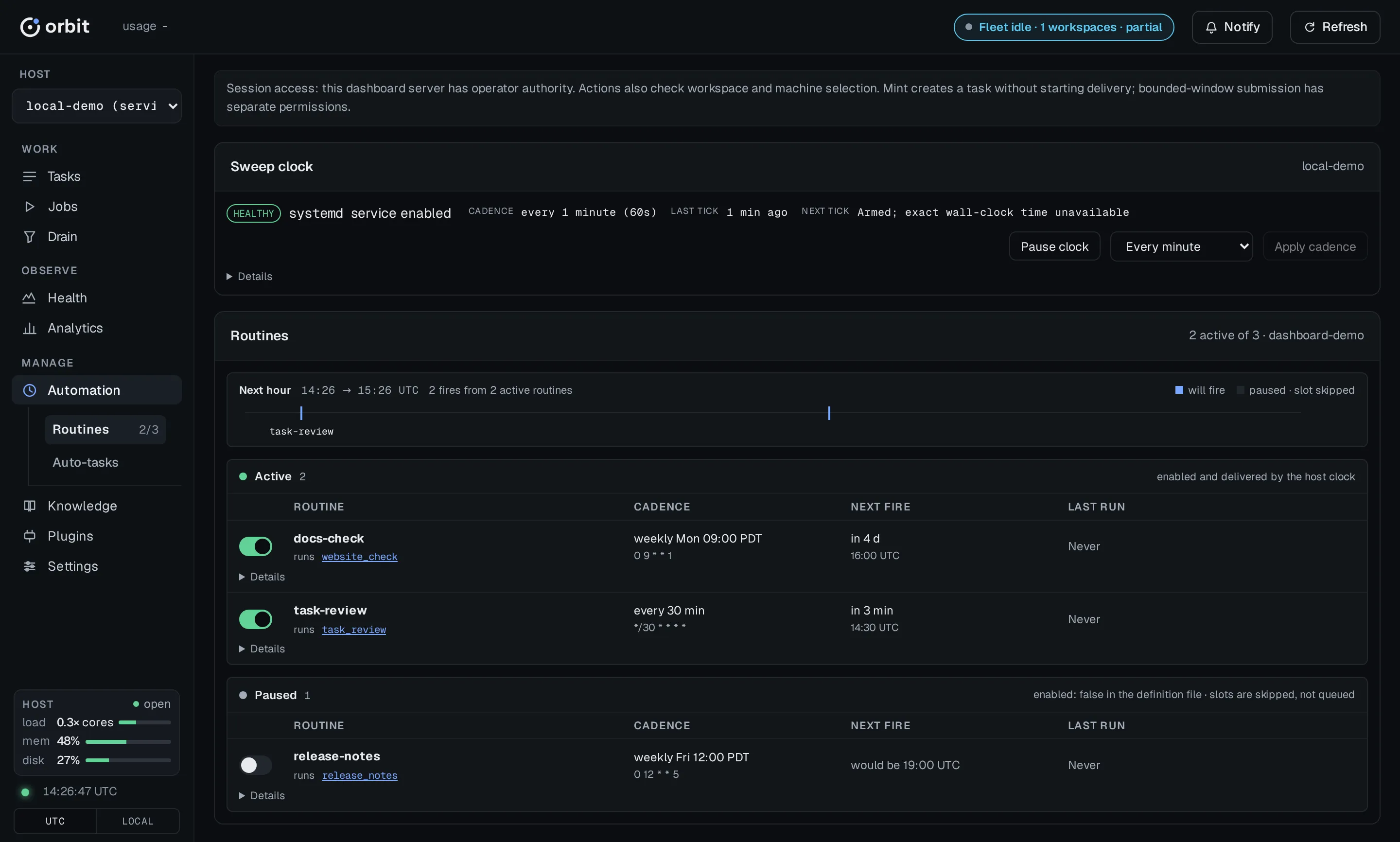
orbit routine list # enabled, paused, next due, last fireorbit routine show <name>Write a routine
Section titled “Write a routine”schemaVersion: 1name: ci_failure_sweep_myrepodescription: File failing CI runs as proposed repair tasks.enabled: truetrigger: cron: "5 * * * *" # 5-field cron, host-local time missed_run: skip # or catch_up_oncetarget: job:ci_failure_sweep_pipelinepolicy: timeout_minutes: 30 overlap: forbid # or allow retries: max: 0 backoff_minutes: 15targetmust be a job (job:<name>). To schedule one activity, wrap it in a one-step job.missed_runhandles slots missed while the machine slept.skip, the default, waits for the next slot and records each missed one with the reasonmissed_run:(skip orbitshows it onroutine list --json last_fire.).detail catch_up_oncefires one make-up run. The seeded worktree-gc routine usescatch_up_once, so a gap runs GC once.orbitwarns when an enabled routine’s last success is older than three times its schedule interval.doctor overlap:, the default, skips a fire while the previous one is still running. Afterforbid timeout_minutes, the stuck fire is recorded as timed out and stops blocking.- There is no host field. Every machine with a registered owner checkout
and its clock on evaluates the routine against its own store. To keep it
off one machine, run
orbitthere;routine pause <name> orbitundoes it. Pauses stay on that machine, are never synced, and survive reboots. To retire a routine, setroutine resume <name> enabled:.false
An invalid file never fires with defaults; Orbit skips it. Field-by-field shapes for cron, state, and delivery triggers are in Scheduling YAML.
3. Define recurring chores as auto-tasks
Section titled “3. Define recurring chores as auto-tasks”An auto-task is a task template that the clock files on a schedule. A new chore is a new definition, never new code or a new routine. The tick files tasks itself, so there is no routine to enable. The file’s schedule, template, dedupe, and preconditions are in Scheduling YAML.
For ready-made repository audits, choose a built-in maintenance sweep before writing your own.
orbit auto-task add \ --name weekly-dep-audit \ --cron "0 9 * * 1" \ --title "Audit outdated dependencies" \ --body "Audit the lockfile and file follow-up tasks." \ --criterion "List outdated packages and their latest versions." \ --criterion "File follow-up tasks for known advisories." \ --tag maintenanceGive exactly one trigger: --cron, --every-minutes, or
--deliveries-landed , which fires once verified deliveries land on a
branch. A cron or interval definition is enabled as soon as you add it. A
delivery-triggered one starts disabled; check it with
orbit before you enable it.
| Option | Effect |
|---|---|
--status |
Status of each filed task: backlog (default), or proposed to approve each one yourself. |
--dedupe |
skip-if-open (default) skips a fire while the previous task is still open, so a stalled backlog never collects copies. always files regardless. |
--crew |
Crew for filed tasks. |
--priority |
low, medium (default), high, or critical. |
--tag |
Extra tag on each filed task, beside the auto-task:<name> tag. Repeatable. |
--required-tools |
Exact canonical tool names copied to each filed task. |
Mint one now
Section titled “Mint one now”orbit auto-task mint weekly-dep-auditThis files one task immediately, like Mint now in the dashboard. It
ignores the schedule, the dedupe policy, and enabled, and it does not move
the next scheduled fire. Use it to see what a definition produces before you
leave it running.
Change, turn off, or delete
Section titled “Change, turn off, or delete”orbit auto-task list --enabledorbit auto-task show weekly-dep-audit# Change only the fields you pass.orbit auto-task update weekly-dep-audit --cron "0 9 * * 2"# Keep the definition and its history when toggling it off.orbit auto-task toggle weekly-dep-audit offorbit auto-task delete weekly-dep-audit --reason "moved to Renovate"delete removes the definition and its scheduler cursor, and writes an audit
record. It refuses while a task filed from the definition is still open and
names those tasks; --force deletes anyway and leaves them alone.
Deleting a shipped default, such as code-review in a repository with no
code, also records an opt-out: later orbit and
orbit runs leave it out, and orbit does not report it
missing. orbit brings it back, disabled as shipped.
Repair a delivery-triggered definition
Section titled “Repair a delivery-triggered definition”A --deliveries-landed definition keeps a ledger of the deliveries it still
owes a review. recover and reset only preview until you pass --reason:
# Resume after a settings change; this keeps the debt.orbit auto-task recover <name> --adopt-settings --reason "<why>"# Reconcile a rebased branch; this keeps the debt.orbit auto-task recover <name> --replay-history --reason "<why>"# Forget the debt and re-baseline at the branch head.orbit auto-task reset <name> --reason "<why>"# Waive one settled failed batch.orbit auto-task update <name> \ --waive-batch <batch-id> \ --waiver-reason "<why>"recover re-files a settled action that closed without
accepted evidence. reset abandons an executing action instead of
cancelling it. Deleting the definition runs the same audited reset, so
delete refuses whenever reset would. The
auto-task reference
covers stalls and the shipped definitions.
Built-in maintenance sweeps
Section titled “Built-in maintenance sweeps”Use these six shipped auto-task definitions to find maintenance work in your repository. They discover its languages, manifests, conventions, and CI configuration rather than assuming a particular toolchain. Start with the sweep that matches the decision you need to make:
| Definition | Choose it when… | Shipped schedule |
|---|---|---|
code-health-sweep |
You need evidence of dead code, duplication, unnecessary complexity, local architectural drift, or compatibility paths ready for retirement. | Every 4,320 minutes (3 days). |
architecture-audit |
You need a package/module dependency graph and evidence for cycles, layering drift, misplaced abstractions, or package splits and merges. | Every 20,160 minutes (14 days). |
structure-sweep |
Oversized or misgrouped source and test files make navigation and maintenance difficult. | Every 10,080 minutes (7 days). |
dependency-freshness |
You need an inventory of outdated, unused, or duplicate dependencies and small upgrade/removal proposals. | 0 — 09:00 on the first of each month. |
flaky-test-hunt |
Hosted CI tests fail and then pass without a relevant change; you need failure-log evidence for fixes. | 15 — Monday at 08:15. |
ci-budget-watch |
You need hosted test-job timings compared with your repository’s documented CI budget. | 45 — daily at 01:45. |
All six ship disabled, with skip-if-open dedupe and assessment tasks
entering backlog. Cron times use the host’s local timezone; intervals are
elapsed minutes, not fixed weekdays. The clock files a task; an agent must
execute that task through your normal workflow to perform the assessment.
The assessments gather evidence and file follow-up work, without editing
your source, dependencies, tests, or CI configuration. They do not authorize
dispatch, merge, or release.
Inspect, preview, try, then enable
Section titled “Inspect, preview, try, then enable”Run these commands from your registered owner checkout. After an Orbit upgrade, inspect and apply workspace synchronization to get the current shipped definitions:
orbit workspace sync --checkorbit workspace syncorbit auto-task listorbit auto-task show dependency-freshnessorbit auto-task show dependency-freshness --jsonorbit clock tick --dry-run --verbosesync writes nothing and exits 3 when convergence is pending. The
JSON show output includes the full template, criteria, and required tools;
the text view shows the definition source, body management, settings, and
schedule. clock previews scheduling decisions
without filing tasks. Disabled definitions do not fire. show
adds baseline/source diagnostics for delivery-triggered definitions; these
six time-based definitions have no delivery baseline to preview.
Try one assessment before leaving it scheduled:
orbit auto-task mint dependency-freshness# After reviewing the task it creates, optionally change the cadence.orbit auto-task update dependency-freshness --cron "0 9 * * 1"orbit auto-task toggle dependency-freshness onorbit auto-task show dependency-freshness# Stop future scheduled filings while keeping the definition and history.orbit auto-task toggle dependency-freshness offmint creates a real task immediately: it ignores the schedule, enabled,
and dedupe, and leaves the scheduler cursor unchanged. It does not execute
the assessment. An open manually minted task prevents later scheduled
copies under skip-if-open. Turning a definition off does not cancel tasks
already filed. Install and enable the host clock
before expecting scheduled filings.
Use update and toggle to customize a shipped definition. Operator
settings such as cadence, enabled state, crew, priority, and complexity are
kept separately from its managed body, so workspace can refresh the
shipped instructions while retaining those settings. Editing the body or
criteria creates a local fork that sync preserves; it no longer receives
automatic body refreshes. Inspect show and sync’s report after upgrading.
Deleted shipped definitions stay opted out until you explicitly restore
them, as described under Change, turn off, or delete.
Prerequisites and limits
Section titled “Prerequisites and limits”The executing agent needs repository access, the installed Orbit skills, and the definition’s required tools. An unknown or human-only required tool is refused at task creation; a registered but disabled tool produces a warning and must be available for execution. Minting and scheduling use the checkout’s local definitions: inspection from a linked checkout can show an owner definition without granting permission to mint or change it there.
The source-oriented sweeps read a pinned integration-branch revision and
discover your repository’s own conventions. They do not run builds, tests,
or timing experiments. Compatibility retirement needs a documented support
window. Architecture changes need graph evidence; proposals that depend on
unmeasured benefits get measurement prerequisites. Layout-only findings
belong to structure-sweep, which uses source files over 1,000 lines,
logic-heavy module indexes over 400 lines, and test files over 2,000 lines
as size thresholds alongside language-specific layout checks.
Dependency freshness needs ecosystem tooling, registry access, and upstream release notes to confirm upgrade targets. Missing tools are reported as gaps; unavailable network/registry access produces an evidence-bearing no-op. Advisory-covered dependencies belong to security work, not this sweep.
The two CI sweeps need hosted CI configuration and granted, authenticated run-history tools; the flaky-test hunt also reads failure logs. They do not rerun tests locally. No hosted test job or unreachable history produces a report explaining the gap, not a claim that CI is healthy. Flake detection uses a 14-day window. CI budget watch measures the last 20 completed runs in the documented population; without a documented budget it records a trend and files no repair task.
Find the evidence and follow-up work
Section titled “Find the evidence and follow-up work”Find assessment tasks by provenance, for example:
orbit task list --tag auto-task:dependency-freshnessOpen the assessment task’s artifacts and execution summary in the dashboard. The outputs differ by sweep:
- Code health:
code-health., with dispositions and up to six proposed improvement tasks. Confirmed correctness bugs are filed separately and do not count toward that cap.json - Architecture:
architecture., with up to three proposed improvement tasks, plus any measurement prerequisites.json - Structure: scan evidence and candidate dispositions in the execution summary, with up to four proposed tasks grouped by package or subsystem.
- Dependencies:
dependency-freshness., with up to three proposed upgrade or removal tasks.json - Flaky tests:
flaky-test-hunt., with up to four proposedjson ci-flakefixes, highest flake count first. - CI budget:
ci-budget-watch/; an over-budget run comments on existingreport. md ci-budgetrepair work or files one proposed repair task.
The templates check existing work before filing and record covered, deferred, and rejected candidates. A run with no actionable findings can succeed with its evidence persisted. Missing evidence remains a stated gap. Review and approve proposed follow-ups before they enter delivery; enabling a sweep does not approve them for you.
4. Watch it work
Section titled “4. Watch it work”A routine fire is an ordinary run, and a filed task is an ordinary task. The
Automation view shows each routine’s and auto-task’s next fire and last
result; orbit and orbit show the same. Find
what got filed by its tag:
orbit task list --tag maintenanceApprove anything filed as proposed, then let a
delivery window pick it up.
Ship unattended
Section titled “Ship unattended”No routine ships work. To ship while you are away, start an orbit
drain for a window, or run orbit yourself. A drain without
--complete leaves shipped work in review for you. Turn on worktree GC
first.
The ship-sweep routine, orbit , and the
workflow. setting were removed. A workspace that still holds the
routine warns and never runs it, and a config that still sets the key loads
with a deprecation warning.
If nothing fires
Section titled “If nothing fires”Check in this order:
- The clock is enabled:
orbit.clock status - This checkout is registered as an owner:
orbit.workspace list - The definition has
enabled:.true - The routine is not paused on this machine:
orbit.routine list - Fires start but fail on a missing credential: check
Scheduled credentials —
orbitnames the unsetdoctor passnames, andorbitlists the namesclock tick --json clock_env_loadedfrom~/.. orbit/ clock. env
orbit shows the decision for every routine
and auto-task, and orbit runs the host health checks. The
CLI reference lists every scheduler command.