

Delivery workflows
Every delivery runs the same gated pipeline: an isolated worktree, a lock on the task’s files, a sandboxed agent, then a pull request. You can start it from three places, and they are interchangeable:
- Your agent. Ask in plain words. The
orbit-orchestrateskill handles anything bigger than one task: filing, preparing, dispatching, and following up. - The dashboard. Buttons for one task, and a drain card for a window.
- The CLI.
orbit, for scripts and schedulers.run …
Runs are durable and asynchronous. Starting one returns a run ID at once, and the run keeps going whether or not you watch.
Hand a spec to your orchestrator
Section titled “Hand a spec to your orchestrator”This is the shortest path from an idea to merged code. Give your agent the outcome you want and ask it to orchestrate:
Here’s the spec for retry support in the sync client: … Break it into Orbit tasks, and once I approve them, ship them and merge what passes.
With the orbit-orchestrate skill, the agent:
- Splits the spec into scoped tasks with acceptance criteria. They wait in
proposed. - Prepares them: checks for duplicates, pins each task’s files, and assigns crews.
- Queues them in the backlog once you approve, in the dashboard or by telling it.
- Starts a delivery window and follows it, diagnosing any run that fails and filing a repair task when the code needs one.
You come back to merged work and a record of every step. Pull requests merge
only when you ask; see Completing work with --complete.
Ship one task
Section titled “Ship one task”| From | Do |
|---|---|
| Dashboard | Click Ship on a backlog task in Tasks, then View run. |
| Agent | “Ship ABC-12.” |
| CLI | orbit |
A ship run uses the workspace’s ship mode:
pr(the default) opens or updates a pull request and stops with the task inreview.localcommits and merges into the base branch before the task reachesreview, soreviewis not a pre-merge stop.
Set the mode with orbit , or change it later with
orbit . On the CLI, --mode and --base override
it for one run.
PR mode needs a Git remote on a forge host. If no remote names a network host
(only a local bare repository, say), Orbit refuses to ship an untagged task
before creating a worktree, and orbit warns on its forge-remote row.
Switch the workspace to local, or tag a single task
delivery:task_local_pipeline to deliver just that task locally.
Drain the backlog
Section titled “Drain the backlog”A drain keeps several tasks in flight for a set time and starts the next ready task as each one finishes. Tasks that touch the same files wait their turn on file locks.
| From | Do |
|---|---|
| Dashboard | Open Tasks, then Start a window in its Drain dock. Pick a window length and parallel tasks, then Start. |
| Agent | “Drain the backlog for four hours, eight at a time.” |
| CLI | orbit |
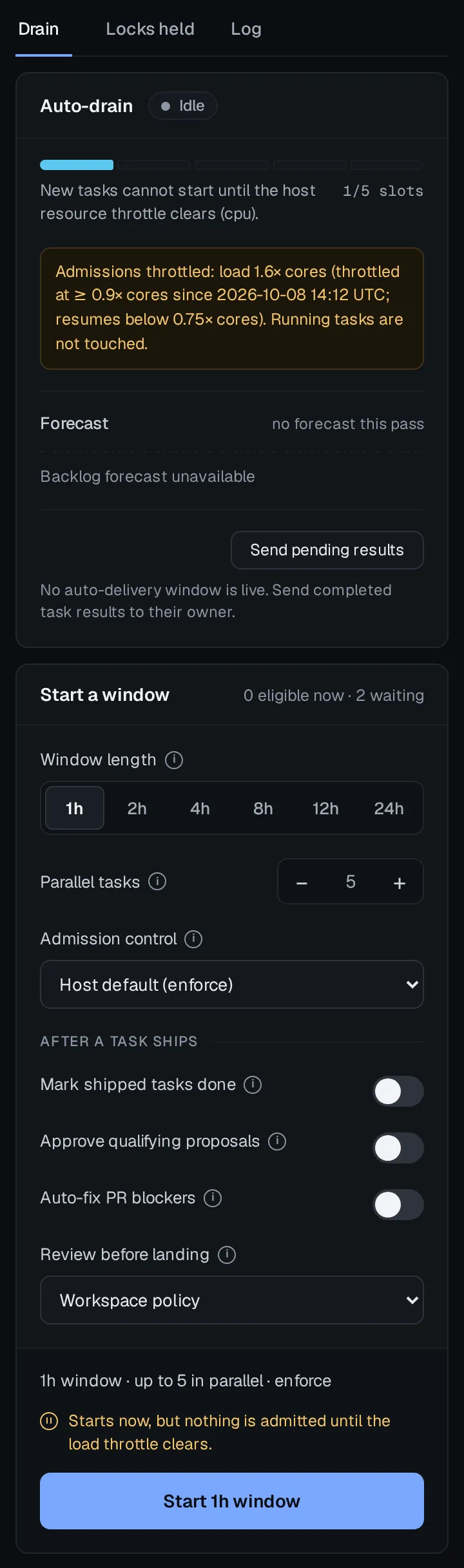
The window bounds only when new work starts; a task already running when it
closes still finishes. The Start a window card’s eligible and waiting
counts show what a window would start, and orbit gives the
same answer with reasons.
Run a Delivery Window covers preparing
work, retuning, and stopping a window.
Completing work with --complete
Section titled “Completing work with --complete”By default a run stops at review, and you close the task after merging. To
let a run finish delivery itself, authorize completion:
| From | Do |
|---|---|
| Dashboard | On the drain card, set When a task finishes to Mark done before Start. |
| Agent | Ask it to merge what passes. Over MCP only a drain can carry this authorization, so the agent starts one. |
| CLI | orbit , or orbit |
With completion, a pr run merges its pull request through GitHub as soon as
branch protection allows. It never uses an administrative bypass, and the task
moves to done only after the merge is verified. A local run reaches done
only after it has committed, merged, and pushed. A closed or blocked pull
request, or a failed merge or push, fails the run and leaves the task in
review.
Local ship and auto runs require completion authorization on that run;
routines never complete tasks. For
distributed handoffs, the owner can instead
set workflow. to authorize landing accepted
handoffs automatically. Its default, "review", waits for Approve handoff
on the owner’s dashboard. This setting applies to distributed handoffs, not
local ship or auto runs. Two limits on per-run completion:
- A drain’s completion covers its whole window, including tasks that reach the backlog after it starts. It does not carry over to any other run.
- It authorizes completion only. It never approves
proposedwork into the backlog, and it does not stand in for a review verdict. The task’s history records which run and operator authorized it.
Watch and recover runs
Section titled “Watch and recover runs”The dashboard’s Runs view lists every run, with Live and Failed filters. A run’s detail shows its steps, events, and timing; a failed run opens on the step it stopped at and the error it recorded. From there you can cancel a running run, Resume a failed one from its first unfinished step, or Replay run to start it again.
Or ask your agent what happened. The orbit-orchestrate skill reads the run’s
evidence, matches it to a known failure, and fixes the cause or files a repair
task instead of re-running blindly.
From the terminal:
orbit run history # recent runsorbit run show "$RUN_ID" # state and step summaryorbit run logs "$RUN_ID" # raw outputorbit run cancel "$RUN_ID" --confirm # stop it and release its locksorbit and orbit show a run’s audit events and its tree
of child runs.
More from the terminal
Section titled “More from the terminal”| Command | What it does |
|---|---|
orbit |
Prepare proposed and backlog tasks by pinning the files each one touches. Promotes and dispatches nothing. |
orbit |
Run any job definition directly. --wait blocks until it finishes. |
The CLI reference lists every flag.